

How to Enroll in the New Credit Card Management System
How to Enroll in the New Credit Card Management System
Getting started is simple! Just follow these steps to enroll in your upgraded credit card platform:
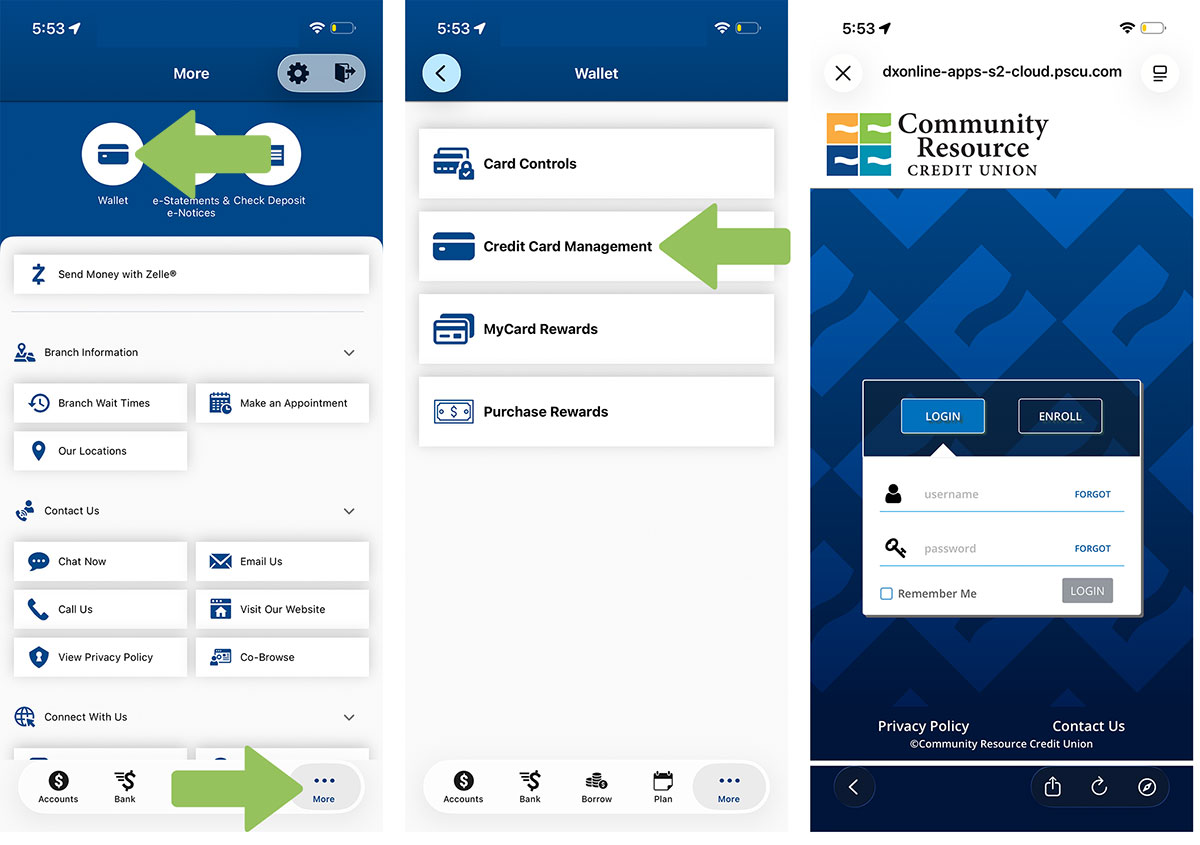
- Log in to Mobile Banking using your CRCU credentials.
- Select "More" from the bottom menu, click on Wallet, then select “Credit Card Management”
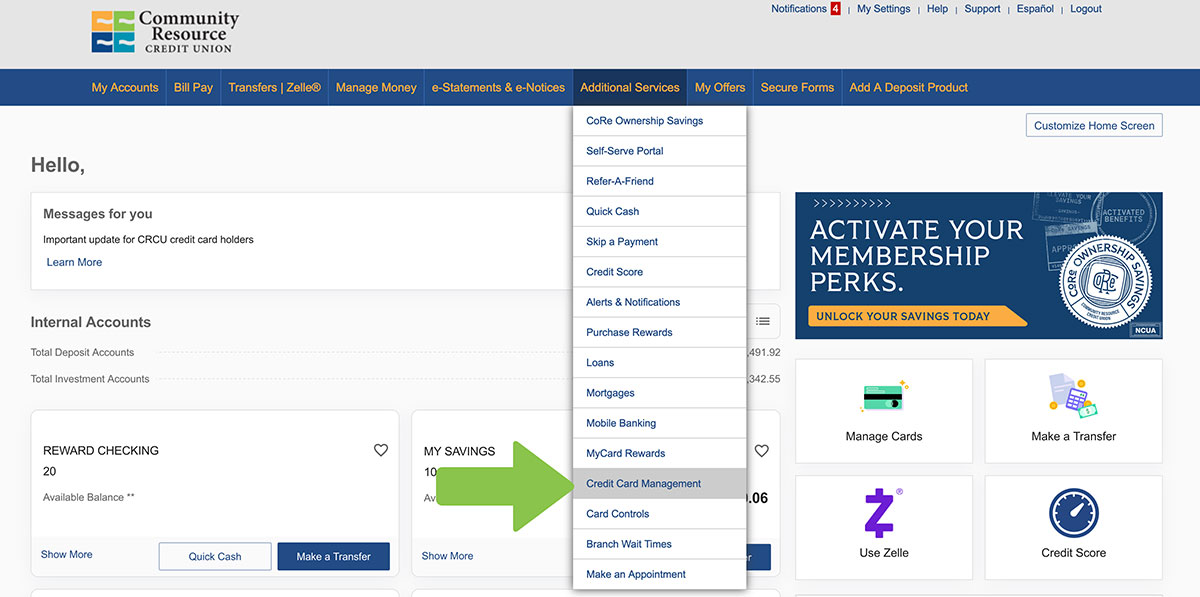
- Log in to Online Banking using your CRCU credentials.
- Select "Additional Services" from the top menu, then select “Credit Card Management”
- If it’s your first time accessing this feature, a screen will appear to begin enrollment.
- Click Enroll, then click Continue to start.
- Enter your Phone Number to receive a one-time passcode via SMS. Enter 6 digit code.
- Review the Terms and Conditions, check the box to accept, and click Next.
- On the Card Info screen, enter your full card number, then click Next.
- On the Verification screen, enter:
- The last 4 digits of the Primary Cardholder’s Social Security Number
- Their date of birth
- The ZIP code tied to the Primary Cardholder’s address
- Then click Next.
- Select Passcode delivery method. (If you are not the primary cardholder, you must coordinate with them to proceed.)
- On the Profile Info screen, enter:
- First & Last Name
- Optional: Card nickname
- Phone number
- Email address (you’ll be asked to enter it twice). Then click Next.
- On the Profile Settings screen:
- Choose a Username
- Create and confirm a Password
- Set up 3 security questions and answers
- Click Submit to complete your enrollment. You’ll see a success message.
- Click OK to continue to your Account Summary.
- To activate your card, click the Activate button, enter the card expiration date, and click Submit.
If you have any questions or need assistance, we're here for you. Visit our Credit Card Conversion page or call us at 281.422.3611.
Reminder About Your New Credit Card
As part of this upgrade, you received a new CRCU credit card, offering enhanced features and added security. We're committed to making this transition as smooth and seamless as possible, so you can keep using your card with confidence.
- Activate your new card
- Follow the instructions that were included with your new card. You can activate it by calling the Card Activation & PIN Management toll-free number at 888-891-2435. Once it's activated, your new card is ready to use right away. Your old card has been deactivated and is no longer active as of July 20, 2026.
- Re-enroll in eStatements
- If you previously received credit card eStatements, you'll need to re-enroll through the new credit card management platform in Digital Banking to continue receiving them electronically.
- Review and update auto pay or Transfers
- If you set up automatic payments from another financial institution to pay your CRCU credit card balance, update them with your new card details.
- If you previously scheduled transfers from your CRCU account to your credit card balance, you'll need to set up a new payment within the credit card management portal.